
Fitness any time, anywhere - register for free today!
Your new UK HR Well at UK portal, powered by Asset Health, is your wellness resource at work and home. It offers you a variety of virtual health and well-being programs and services to UK employees, retirees, spouses and sponsored dependents. Inside the Well at UK portal, our UK community can take advantage of:
- Well-being challenges
- Step challenges
- Health education resources
- Over 1,000+ online fitness classes
- And more! At no cost to you.
Well at UK is an extension of UK HR Health and Wellness’ high-touch, expert-led, comprehensive well-being programs, offerings and personalized support across mental health, financial wellness, personal resilience, physical activity and nutrition. Learn more here.
For the best Well at UK experience, we recommend you use Google Chrome or Microsoft Edge to access your Well at UK portal.
Get active with LifeSpeak on-demand fitness classes

Access 1,000+ virtual, on-demand fitness classes for all ability levels that can be accessed anywhere any time. Classes include yoga, HIIT, strength training, running and walking, work breaks, dance, stretching and more!
- Log in to your health and wellness dashboard. Once logged in, click the scrolling Well at UK banner. Once in Well at UK portal, click the tile for LifeSpeak and you are in!
- After your initial access to the Well at UK portal, you can download the Asset Health app to connect with Well at UK directly. For instructions on how to download the app, log in to your health and wellness dashboard and click on the Well at UK banner. You must login through your dashboard first before connecting your app.
Stay connected with colleagues

Join the Well at UK Message Board today to connect with others, share what makes people thrive, and enjoy friendly conversations about the challenges and more. Get connected now!
- Log in to your Health and Wellness dashboard. Once logged in, click the scrolling Well at UK banner. Once in the Well at UK portal click on the message board tile and start connecting and messaging with your colleagues.
- After your initial access to the Well at UK portal, you can download the Asset Health app to access Well at UK directly. For instructions on how to download the app, log in to your Health and Wellness dashboard and click on the scrolling Well at UK banner.
Participate in well-being challenges

Log in to your Health and Wellness dashboard at ukhr.uky.edu/wellness. Once logged in, click the scrolling Well at UK banner. Once in you are in your Well at UK portal, click on the Challenge tile or challenge banner to read the details.
Need a little motivation to start or stick to healthier habits? Join challenges throughout the year.
- Step challenges-Leaderboard style!
- Nutrition challenges
- Personal resilience challenges
- Physical activity challenges
- Peer to peer-challenge you colleagues to better health!
That’s it!
FAQs
Who can access the Well at UK portal?
All active employees with a full-time equivalency (FTE) of 0.20 and above, their spouses/sponsored dependents, UK retirees and their spouses can access the full Well at UK portal.
Note: Newly hired faculty and staff will gain access to the Well at UK portal approximately one week from their start date. Their spouse/sponsored dependent will also gain access at this time.
If an employee’s employment changes with the university at any time, this may impact their ability and their spouse’s ability to access the Well at UK portal.
Questions on eligibility? Contact UK HR Health and Wellness at 859-257-9355, option 1.
How to log in to your Health and Wellness dashboard and access Well at UK - Employees and retirees with active LinkBlue credentials
If this is your first time participating with UK HR Health and Wellness, you may need to do a first-time login process in your Health and Wellness dashboard. For the best experience, we recommend using Google Chrome or Microsoft Edge to access it. Please log in to your Health and Wellness dashboard first, then follow the instructions below to access the Well at UK portal.
Employees and retirees with active LinkBlue credentials:
- Use your LinkBlue username and password and complete the required consent and notice, if prompted.
- Select the Well at UK banner at the top of the screen.
- Employees and retirees with active LinkBlue credentials may be prompted to enter them into the LinkBlue verification page.
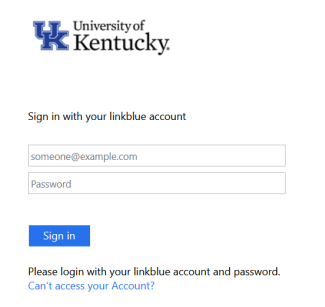
Once you are logged into the dashboard, click the banner at the top of the page that says “Welcome to Well at UK”
- You’ll see this screen the first time only.
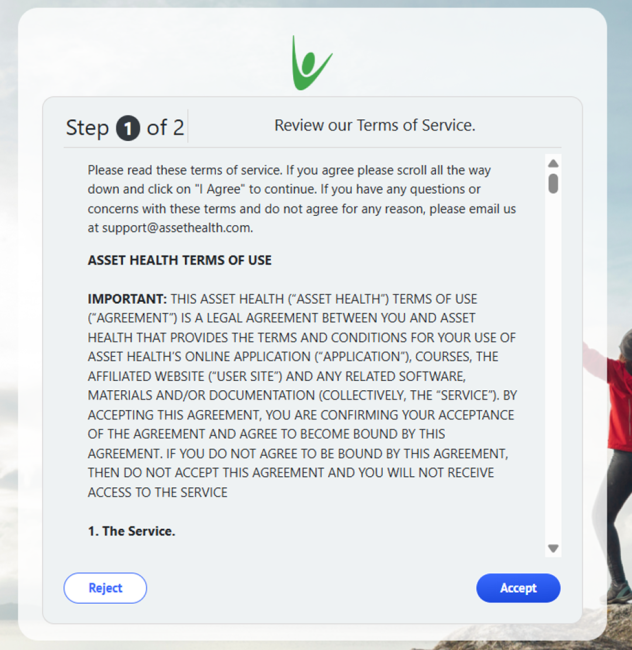
2. Then, you will see this screen:
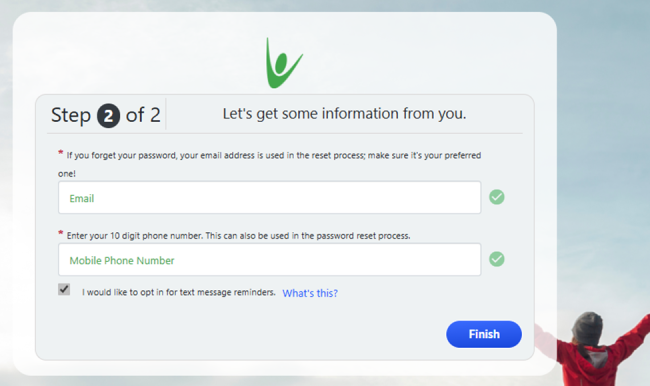
You are in! Once you do this the first time, you will not have to again. The link will take you directly to your page.
How to log in to your Health and Wellness dashboard and access Well at UK - Retirees, spouses and sponsored dependents with no LinkBlue credentials
If this is your first time participating with UK HR Health and Wellness, you may need to do a first-time login process in your Health and Wellness dashboard. For the best experience, we recommend using Google Chrome or Microsoft Edge to access it. Please log in to your Health and Wellness dashboard first, then follow the instructions below to access the Well at UK portal.
- Create an account if you don’t already have one.
- Complete required consent and notice, if prompted.
- Select the Well at UK banner.
- Create an account in the Well at UK portal by clicking Login Instructions and entering the information below.
First time logging In?
Use the default credentials as described below.
- Default Username: First initial first name + Last Name + last 4 SSN
- Default password: DOB (mmddyyyy)
- These credentials are for first-time use only.
After your first login, you will be asked to set your own unique account credentials and contact information for accessing the site in the future.
Once you are logged into the dashboard, click the banner at the top of the page that says “Welcome to Well at UK”
- You’ll see this screen the first time only.
2. Then, you will see this screen:
You are in! Once you do this the first time, you will not have to again. The link will take you directly to your page.
How do I access on-demand fitness classes?
- Once you are in the Well at UK portal, click on the tile for LifeSpeak.
- First-time users will be asked to enter an email address and create a password. Once you complete this, the button will take you directly to the classes and you won’t have to enter your email and password again.
- LifeSpeak will also ask for your email notification preferences:
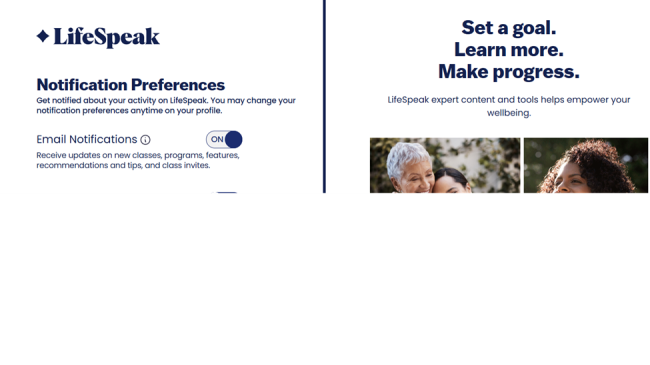
Why should I join Well at UK?
We’re so glad you asked! Well at UK offers a variety of resources to support your well-being, including access to 1,000+ virtual fitness classes, engaging challenges and so much more.
By participating, you and spouses/sponsored dependents can enjoy benefits such as:
- Increasing your physical activity
- Connecting with co-workers and friends
- Bettering your health and overall well-being
- Building positive habits
- Reducing stress
There truly is something for everyone. Join us and start thriving today!
Confidentiality
Your privacy is important to us. The information provided within the Well at UK portal, powered by Asset Health and within the Asset Health mobile app, is treated as confidential. To protect your privacy, the University of Kentucky has contracted with Asset Health, Inc., to administer online mobile health and well-being programs, resources and well-being questionnaires.
Information that is collected will be used to evaluate the effectiveness of our programs and services (quality assurance), contribute to scientific research and process your incentive if applicable. When used for evaluation and scientific research, only aggregate (group) data will be considered, with no personally identifiable information. This helps the university better understand the collective health of our faculty, staff and their families and to assist with planning future programs that address the needs of our community.
Your personally identifiable health data will not be shared with your manager, nor will it be added to any University of Kentucky staff files. In addition, your information will not affect insurance coverage or benefits nor will they be disclosed to your insurance company.
What data is collected and how is it used?
| Asset Health ("Us," "We," or "Our") created this Privacy Policy ("Privacy Policy") to ensure the confidence of users ("you" or "your") of our Asset Health software program and website (collectively, the "Product"), and to demonstrate our commitment to fair information practices and the protection of privacy. |
|
|
|
2. Uses of Information Collected. |
|
3. Confidentiality and Security of Personal Information. |
|
4. Lost or Stolen Information. |
|
5. Other Limits to Your Privacy. |
| 6. Updates and Changes to Privacy Policy. We reserve the right, at any time and without notice, to add, change, update or modify this Privacy Policy simply by posting such change, update or modification on our website. Any such change, update or modification will be effective immediately upon posting on our website. |
Q-What health information is collected and how is it used?
| How We Protect Your Privacy We are required by law to protect the privacy of your protected health information (PHI) and to provide you with this notice of our privacy practices. We will not disclose confidential information without your authorization unless it is necessary to provide your health benefits and administer the Plan(s), or as otherwise required or permitted by law. When we need to disclose individually identifiable information, we will follow the policies described in this Notice to protect your confidentiality. We maintain confidential information and have procedures for accessing and storing confidential records. We restrict internal access to your confidential information to employees who need that information to provide your benefits. We train those individuals on policies and procedures designed to protect your privacy. Our Privacy Officer monitors how we follow those policies and procedures, and educates our organization on this important topic. |
|
|
Uses and Disclosures With Your Written Authorization We will not use or disclose your confidential information for any purpose other than the purposes described in this Notice, without your written authorization. For example, we will not 1) supply confidential information to another company for its marketing purposes, 2) sell your confidential information, or 3) provide your confidential information to a potential employer with whom you are seeking employment, without your signed authorization. You may revoke an authorization that you previously have given by sending a written request to our Privacy Officer, but not with respect to any actions we already have taken. |
Your Individual Rights You have the following rights: |
| Right to inspect and copy your protected health information. Except for limited circumstances, you may review and copy your PHI. Your request must be addressed to the Privacy Officer. In certain situations we may deny your request, but if we do, we will tell you in writing of the reasons for the denial and explain your rights with regard to having the denial reviewed. If the information you request is in an electronic health record, you may request that these records be transmitted electronically to yourself or a designated individual. If you request copies of your PHI, we may charge you a reasonable fee to cover the cost. Alternately, we may provide you with a summary or explanation of your PHI, upon your request, if you agree to the rules and cost (if any) in advance. In the event your employer, as sponsor of its wellness plan, terminates the services of Asset Health, pursuant to our contractual requirements and the governing HIPAA and HITECH regulations, Asset Health is required to proceed with deidentification of and ultimate destruction of your PHI securely stored by Asset Health. |
|
Right to correct or update your protected health information. If you believe that the PHI we have is incomplete or incorrect, you may ask us to amend it. Your request must be made in writing and must be addressed to the Privacy Officer. To process your request, you must use the form we provide and explain why you think the amendment is appropriate. We will inform you in writing whether the amendment will be made or denied. If we agree to make the amendment, we will make reasonable efforts to notify other parties of your amendment. If we agree to make the amendment, we will also ask you to identify others you would like us to notify.
If we deny the requested amendment, we will notify you in writing how to submit a statement of disagreement or complaint, or request inclusion of your original amendment request as part of your PHI. |
| Right to obtain a list of the disclosures. You have the right to get a list of PHI disclosures, which also is referred to as an accounting. You must make a written request to the Privacy Officer to obtain this information. The list will not include disclosures we have made as authorized by law. For example, the accounting will not include disclosures made for treatment, payment and health care operations purposes (except as noted in the following paragraph). Also, no accounting will be made for disclosures made directly to you or under an authorization that you provided or those made to your family or friends. The list will not include other disclosures, including incidental disclosures, disclosures we have made for national security purposes, disclosures to law enforcement personnel, or disclosures made before April 14, 2003. The list we provide will include disclosures made within the last six years unless you specify a shorter period. You may also request and receive an accounting of disclosures of electronic health records made for payment, treatment or health care operations during the prior three years for disclosures made on or after 1) January 1, 2014, for electronic health records acquired before January 1, 2009, or 2) January 1, 2011, for electronic health records acquired on or after January 1, 2009. The first list you request within a 12-month period will be free. You may be charged for any additional lists within a 12-month period. |
| Right to choose how we communicate with you. You have the right to ask that we send information to you at a specific address (for example, at work rather than home) or in a specific manner (for example, by email rather than regular mail). We must agree to your request if you state that disclosure of the information may put you in danger. |
| Right to request additional restrictions on health information. You may request restrictions on our use and disclosure of your confidential information for the treatment, payment and health care operations purposes explained in this Notice. While we will consider all requests for restrictions carefully, we are not required to agree to a requested restriction. However, we must comply with your request to restrict a disclosure of your confidential information for payment or health care operations if you paid for these services in full, out of pocket. |
| Questions and Complaints If you believe your privacy rights have been violated, you may file a complaint with us or the U.S. Department of Health and Human Services. To file a complaint with us, put your complaint in writing and address it to the Privacy Officer listed below. The Plan(s) will not retaliate against you for filing a complaint. You may also contact the Privacy Officer if you have questions or comments about our privacy practices. |
| Future Changes to Our Practices and This Notice We are required to follow the terms of the privacy notice currently in effect. However, we reserve the right to change our privacy practices and make any such change applicable to the PHI we obtained about you before the change. If a change in our practices is material, we will revise this Notice to reflect the change. We will send or provide a copy of the revised Notice. You may also obtain a copy of any revised Notice by contacting the Privacy Officer. |
General questions:
UK HR Health and Wellness at healthandwellness@uky.edu
859-257-9355, Option 1
Monday through Friday, 8 a.m. – 5 p.m.
Eligibility questions:
UK HR Health and Wellness at healthandwellness@uky.edu
859-257-9355, Option 1
Monday through Friday, 8 a.m. – 5 p.m.
Well at UK powered by Asset Health portal and app questions:
Asset Health
support@assethealth.com
855-444-1255
Representatives are available Monday through Friday, 8 a.m. – 8 p.m. ET.
Well at UK powered by Asset Health, device syncing questions:
Asset Health
support@assethealth.com
855-444-1255
Representatives are available Monday through Friday, 8 a.m. – 8 p.m. ET.