

ThriveBlue Powered by Asset Health
Your new UK HR ThriveBlue portal, powered by Asset Health, is your wellness resource at work and home. It offers you a variety of virtual health and well-being programs and services to UK employees, retirees, spouses and sponsored dependents. Inside your ThriveBlue portal, our UK community can take advantage of:
- Well-being challenges
- Step challenges
- Health education resources
- Over 1,000+ online fitness classes
- And more! At no cost to you.
ThriveBlue is an extension of UK HR Health and Wellness’ high-touch, expert-led, comprehensive well-being programs, offerings and personalized support across mental health, financial wellness, personal resilience, physical activity and nutrition. Learn more at https://hr.uky.edu/work-life-and-well-being.
For the best ThriveBlue experience, it is recommended you use Google Chrome or Microsoft Edge to access your ThriveBlue portal.
Get Active with LifeSpeak on Demand Fitness Classes

Access 1,000+ virtual, on-demand fitness classes for all ability levels that can be accessed anywhere any time. Classes include yoga, HIIT, strength training, running and walking, work breaks, dance, stretching and more!
- Log in to your health and wellness dashboard. Once logged in, click the scrolling ThriveBlue banner. Once in ThriveBlue portal, click the tile for LifeSpeak and you are in!
- After your initial access to the ThriveBlue portal, you can download the Asset Health app to connect with ThriveBlue directly. For instructions on how to download the app, log in to your health and wellness dashboard and click on the ThriveBlue banner. You must login through your dashboard first before connecting your app.
Participate in Well-being Challenges
Log in to your Health and Wellness dashboard at ukhr.uky.edu/wellness. Once logged in, click the scrolling ThriveBlue banner. Once in you are in your ThriveBlue portal, click on the Challenge tile or challenge banner to read the details.
Need a little motivation to start or stick to healthier habits? Join challenges throughout the year.
- Step challenges-Leaderboard style!
- Nutrition challenges
- Personal resilience challenges
- Physical activity challenges
- Peer to peer-challenge you colleagues to better health!
That’s it!
Stay Connected with Colleagues

Join the ThriveBlue Message Board today to connect with others, share what makes people Thrive, and enjoy friendly conversations about the challenges and more. Get connected now!
- Log in to your Health and Wellness Dashboard. Once logged in, click the scrolling ThriveBlue banner. Once in ThriveBlue portal click on the message board tile and start connecting and messaging with your colleagues.
- After your initial access to the ThriveBlue portal, you can download the Asset Health app to access ThriveBlue directly. For instructions on how to download the app, log in to your Health and Wellness dashboard and click on the scrolling ThriveBlue banner.
FAQs
Who can access the ThriveBlue portal?
All active, .20 full time employees (FTEs) and above, their spouses/sponsored dependents, UK retirees and their spouses can access the full ThriveBlue portal.
Note: Newly hired faculty and staff will gain access to the ThriveBlue portal approximately one week from their start date. Their spouse/sponsored dependent will also gain access at this time.
If an employee’s employment changes with the university at any time, this may impact their ability and their spouse’s ability to access the ThriveBlue portal.
Questions on eligibility? Contact UK HR Health and Wellness at 859-257-9355, option 1.
How to Log in to your Health and Wellness Dashboard and Access ThriveBlue?
If this is your first time participating with UK HR Health and Wellness, you may need to do a first-time login process from your Health and Wellness dashboard. For the best experience, it is recommended that you use Google Chrome or Microsoft Edge to access your Health and Wellness dashboard. Please log into your Health and Wellness dashboard first before accessing the ThriveBlue Portal by following the below instructions.
Health and Wellness dashboard login Information:
Employees and Retirees with an active LinkBlue credential:
- Use your LinkBlue username & password and complete required consent and notice, if prompted.
- Select the ThriveBlue banner.
- Employees and Retirees with an active LinkBlue credential, may be prompted to enter your linkblue credentials into LinkBlue verification page.
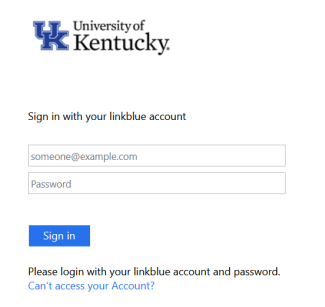
Health and Wellness dashboard login Information:
Employees and Retirees with LinkBlue credentials:
- Use your LinkBlue username and password
Retirees, spouses and sponsored dependents with no LinkBlue credentials:
- Create an account if you don’t already have one.
- Complete required consent and notice, if prompted.
- Select the ThriveBlue banner.
- Create an account in the ThriveBlue portal by clicking Login Instructions and entering the below information.
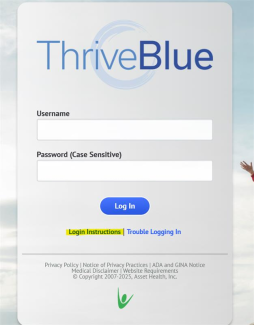
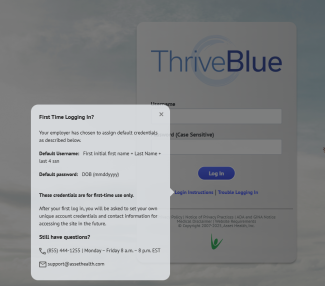
First Time Logging In?
Use the default credentials as described below.
- Default Username: First initial first name + Last Name + last 4 ssn
- Default password: DOB (mmddyyyy)
- These credentials are for first-time use only.
After your first log in, you will be asked to set your own unique account credentials and contact information for accessing the site in the future.
Confidentiality:
Your privacy is important to us. The information provided within the ThriveBlue portal, powered by Asset Health and within the Asset Health mobile app, is treated as confidential. To protect your privacy, the University of Kentucky has contracted with Asset Health, Inc. to administer online mobile health and well-being programs, resources and well-being questionnaires.
Information that is collected will be used to evaluate the effectiveness of our programs and services (quality assurance), contribute to scientific research and process your incentive if applicable. When used for evaluation and scientific research, only aggregate (group) data will be considered, with no personally identifiable information. This helps the university better understand the collective health of our faculty, staff and their families and to assist with planning future programs that address the needs of our community.
Your personally identifiable health data will not be shared with your manager, nor will it be added to any University of Kentucky staff files. In addition, your information will not affect insurance coverage or benefits nor will they be disclosed to your insurance company.
Why should I join ThriveBlue?
We’re so glad you asked! ThriveBlue offers a variety of resources to support your well-being, including access to 1,000+ virtual fitness classes, engaging challenges and so much more.
By participating, you and spouses/sponsored dependents can enjoy benefits such as:
- Increasing your physical activity
- Connecting with co-workers and friends
- Bettering your health and overall well-being
- Building positive habits
- Reducing stress
There truly is something for everyone. Join us and start thriving today!
General questions:
UK HR Health and Wellness at healthandwellness@uky.edu
859-257-9355, Option 1
Monday through Friday, 8 a.m. – 5 p.m.
Eligibility questions:
UK HR Health and Wellness at healthandwellness@uky.edu
859-257-9355, Option 1
Monday through Friday, 8 a.m. – 5 p.m.
ThriveBlue powered by Asset Health portal and app questions:
Asset Health
support@assethealth.com
855-444-1255
Representatives are available Monday through Friday, 8 a.m. – 8 p.m. ET.
ThriveBlue powered by Asset Health, device syncing questions:
Asset Health
support@assethealth.com
855-444-1255
Representatives are available Monday through Friday, 8 a.m. – 8 p.m. ET.